
The Issue
After logging into the remote host using Google Antigravity, the editor threw an error:

I was totally baffled—it worked fine on other machines, so why was it failing on mine?
Debugging
A quick Google search led me straight to this post: Hey Google: Does antigravity just not work with Ubuntu 24.04?
I started debugging by following the discussion in the thread.
First, I checked the memory specs and system versions (Ubuntu 24/22)... After trying a few different VMs and getting the same result, I started suspecting the host machine itself.
The thread mentioned that a missing AVX instruction set on the CPU could be the culprit. 
But here's the kicker: even though this server runs on an older E5-2667 CPU, it does support that instruction set.
So, I shifted my focus to the VM's CPU configuration, which was set to x86-64-v2-AES...
The Solution
Okay, I found the problem. For compatibility reasons, PVE (Proxmox VE) defaults VMs to a CPU type with a limited instruction set. To use the required AVX instructions, you need to change the VM's CPU type to "host".
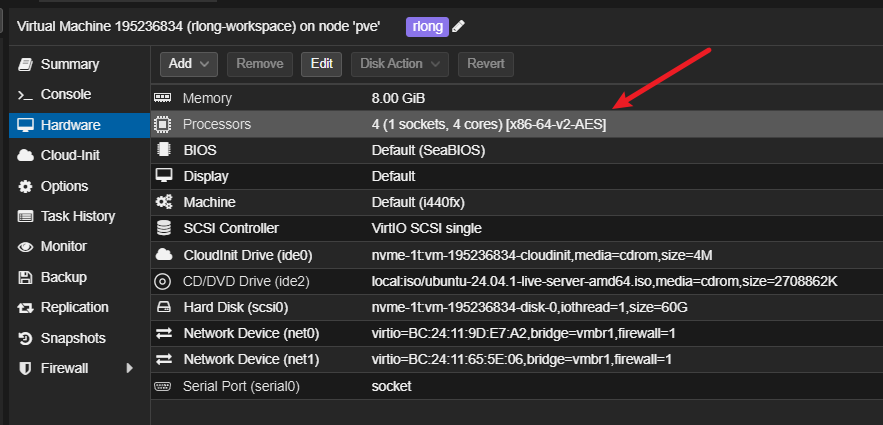
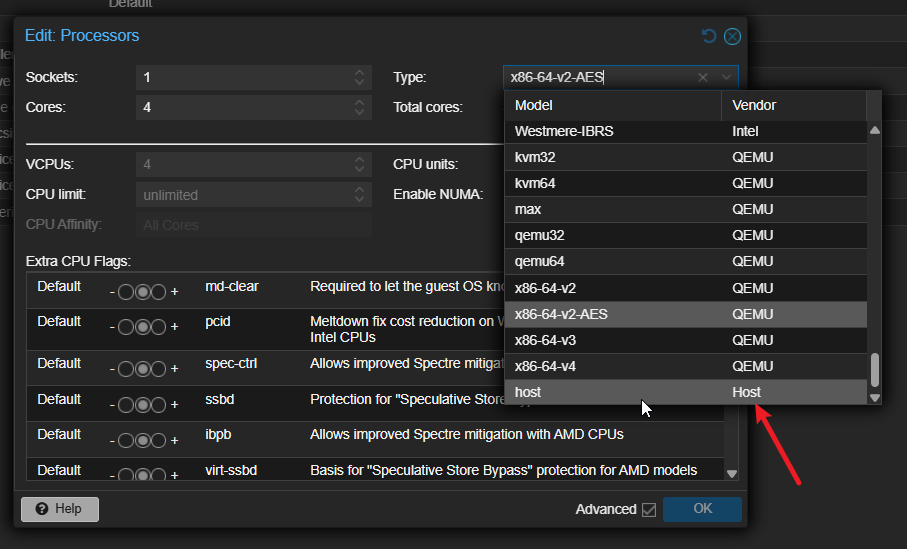
I switched the VM's CPU from the default x86-64-v2-AES to host.
Hehe, and just like that, it’s fixed! :D
this pages was translate by AI
Chinese version: click me